Step 2: Generate a Draft Model
Based on the results of step 1, step 2 of the workflow generates a draft model based on the template model.
Note
When running this step outside the context of the workflow, the input files need to be related to each other. The identifiers of the genes for the matches of the bidirectional blast results and the genes in the template model are the same or can be adjusted using the given parameters as needed.
A graphical representation of the steps can be found below:
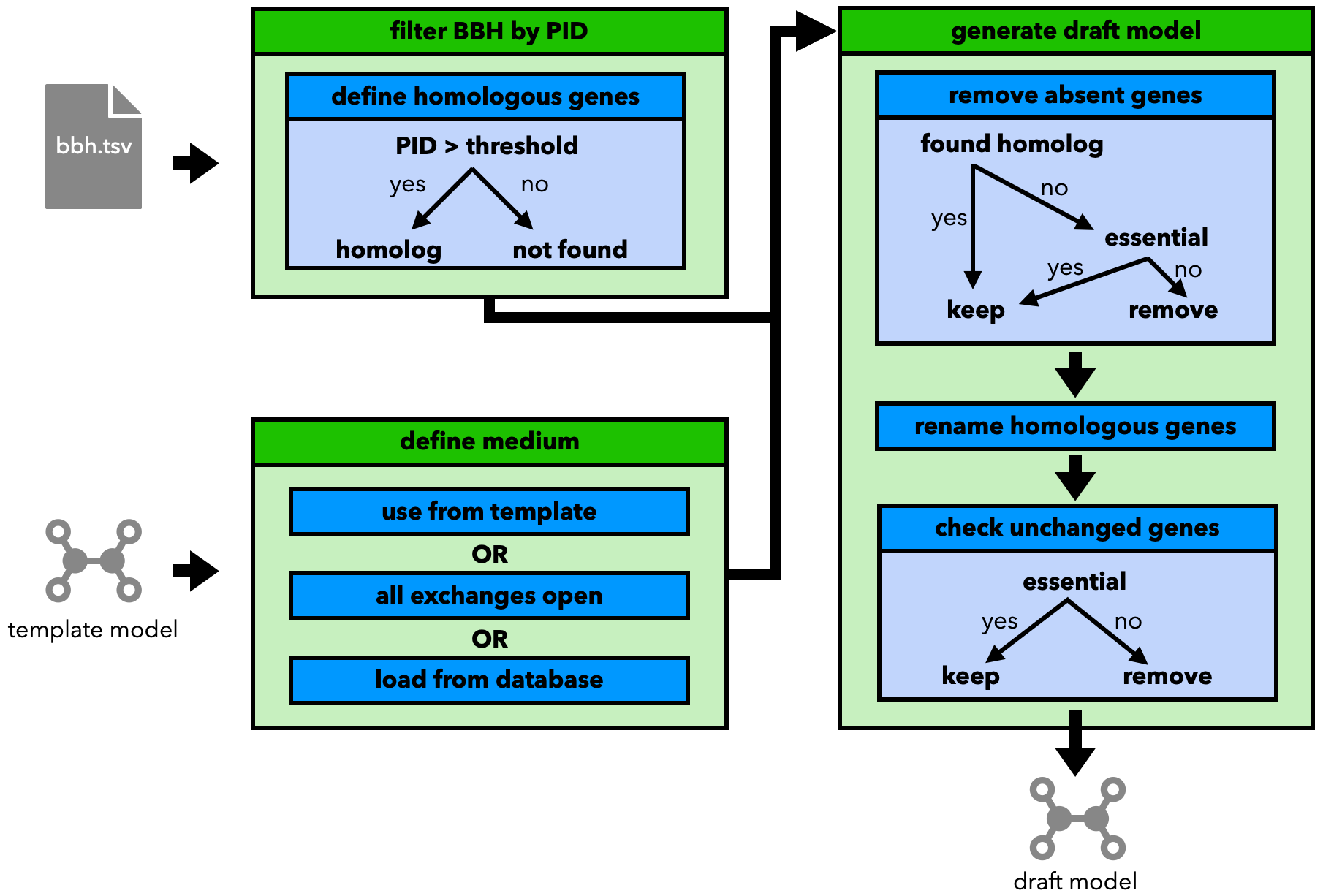
The draft model is constructed based on the idea of Norsigian et al.[1] by:
Filtering the BLAST best bidirectional hits by their percentage identity value (only matches with a PID greater than a given threshold are considered homologous).
Choosing a medium for the new model. Options include:
Using the one from the template
Setting all exchanges to open (not advised, quickly leads to unrealistic growth rates)
Loading one from the
refineGEMsdatabase
Removing genes from the template that have no (found) homolog in the template genome.
Under the condition, that the removed gene is not neccessary for the growth of the model
Renaming the homologous genes to match the names of the new genome
Checking unchanged genes
remove them, if they are not essential for the growth of the model